if: A Simple (artificial) Example
Consider the problem of checking a number to see if it is positive or
negative, and outputting an appropriate message. The SIPO statements we have
used so far are not up to the task. The problem is that the message we output
depends on the sign of the variable, and that may change from one run of the
program to the next. That means that both the possible output statements "is
negative" and "is positive" must be present in the program, and that the
program must select which one to execute based on the sign of the variable.
Python has a selection statement called if that allows us to do
that, like this:
value = input("Enter an integer (e.g, 23 or -118): ")
if value < 0:
    print value, "is negative"
else:
    print value, " is positive"
(Note that the statements after the if and else
statements are indented four spaces.)
The first statement should look familiar, but here's what happens next. The
if statement says that if value is less than 0 then
the first print statement should be executed, otherwise ("else")
the second print statement should be executed.
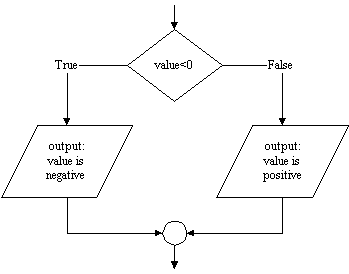
Here's how the execution of the statements takes place. When the program
reaches the if statement, it evaluates the expression
value < 0. If the expression is True (the number stored in value
is less than zero) it executes the first print statement, and then
skips over the else and the second print statement. On
the other hand, if the expression is False, it skips the first print statement and
executes the statement after the else. The key is that in either
case only one of the print statements is executed, i.e. the
if statement selects which one to execute based on the
test value < 0.
The flow of control of this if statement can be represented
using a flowchart as shown below. Following the arrows (the flow so to speak) from top to bottom makes it clear that on any run of
the program only one of the two output statements will be executed.