Reading from text files
Here's how to read data from a text file.
To begin with use IDLE to create a small text test file:
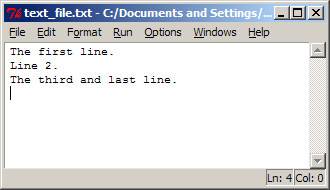
We can visualize this on disk as,
| T | h | e | f | i | r | s | t | l | i | n | e | . | \n | L | i | n | e | 2 | . | \n | T | h | e | t | h | i | r | d | a | n | d | l | a | s | t | l | i | n | e | . | \n | EOF |
The only new item here are the \n characters These denote new
line characters which like EOF characters vary between operating sytems.
(Don't worry the Python you installed was compiled to know what they are on
your system).
There are three common ways of reading this,
- one line at a time, processing lines as we go,
- the whole file into a string,
- the whole file into a list of strings, one entry per line.
When possible option 1. is preferred since it is the most memory efficient because it holds only a bit of the file (one line) in memory at any time.
Here's the Python code for each of these options.
- One line at a time:
# file_read_1.py
f = open('text_file.txt', 'r') # Open the file.
for line in f:                 # Iterate through the file a line at a time.
    print line,                # Process the current line.
f.close()                      # Close the file.
Notes:
- The arguments to the open function are the name of the file to
open, and the mode in which to open it. Here the
rstands for read. - As you can see by the
forstatement, iteration over file objects is defined just as it is for lists. The default iteration is to grab one line each time. - You should always close files when you are finished reading from them. The file object will be garbage collected eventually anyway and the file closed at that time, but closing ASAP reduces memory consumption and allows other processes to access the file sooner.
Output:
>>>
The first line.
Line 2.
The third and last line.
>>>
- The arguments to the open function are the name of the file to
open, and the mode in which to open it. Here the
- The whole file into a string:
# file_read_2.py f = open('text_file.txt', 'r') s = f.read() print 's is', len(s), 'characters long.' print s f.close()- The read method of the file object f reads the entire file including newline characters into memory.
>>>
s is 49 characters long.
The first line.
Line 2.
The third and last line.
>>>
- Note that the file looks the same as before when displayed because the terminal interprets the newline characters embedded in it as instructions to start new lines.
read()can also take an integer argument specifying how many bytes to read from the file. Its default behaviour is to read all of them.
- The whole file into a list of strings,
# file_read_3.py
f = open('text_file.txt', 'r')
lines = f.readlines()
print lines
f.close()
Output:
>>>
['The first line.\n', 'Line 2.\n', 'The third and last line.\n']
>>>
Note that the newline character is included. If you don't want it you need to strip it yourself.