So far there isn't much to brag about here. We can after all open html
files directly in our browser without servers getting in the way. But this
server also supports CGI-based communication (see those CGI substrings
sprinkled throughout?). To check that it is working as a CGI server we need
to test it with a Python program not a static HTML file. The key thing to be aware
of to make this work are the server's built-in assumptions about file layout.
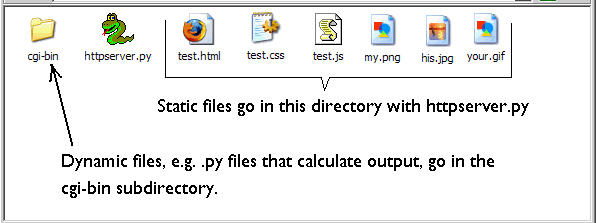
Files in the same directory as it ('.') will be served as static files. Files
in its cgi-bin subdirectory ('./cgi-bin') will be served dynamically, i.e. it
will attempt to run them as Python programs and return the program's output
to the client (i.e. browser). So things should be organized like this:
Go ahead:
Copy and paste this code into a file named testcgi.py and save it in the
cgi-bin directory.
print '''Content-type: text/html

<!DOCTYPE html PUBLIC "-//W3C//DTD XHTML 1.0 Transitional//EN"
      "http://www.w3.org/TR/xhtml1/DTD/xhtml1-transitional.dtd">
<html xmlns="http://www.w3.org/1999/xhtml">
<head>
  <meta http-equiv="content-type" content="text/html; charset=iso-8859-1" />
  <title>Test file</title>
</head>

<body>
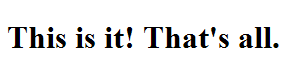
<h1>This is it! That's all.</h1>
</body>
</html>'''
Navigate to http://localhost/cgi-bin/testcgi.py. (Note
that as long as you use localhost and are serving on port 80 you
shouldn't specify the absolute path to the file. Instead the path will be
relative to the server root which is the directory httpserver.py is in). You should see this display in your
browser: