We'll need a pair of files: the original HTML file that presents a form to
fill in with input values, and a Python program that processes the form values
and returns some output. Here's our input form respond.html:
<!DOCTYPE html>
<html lang="en">
<head>
  <meta charset="UTF-8" />
  <title>Input form for respond.py</title>
</head>

<body>
<h2>Input form for respond.py</h2>

  <form method="post" action="cgi-bin/respond.py">
    <p>Enter your name: <input type="text" name="user" /></p>
    <p><input type="submit" /></p>
  </form>

</body>
</html>
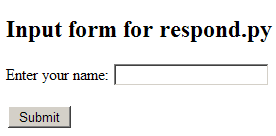
Viewed in the browser it will look something like this,
Everything is set up by the lines of the form element:
<form method="post" action="cgi-bin/respond.py">Submit button is clicked the form data should be sent to the
program cgi-bin/respond.py on the server. <p>Enter your name: <input type="text" name="user" />"user". <p><input type="submit" /></p>Submit button on the screen. Nothing is sent to
the server until this button is clicked, but as soon as it is clicked
the form contents are encoded and forwarded to the server. The Submit button is the GUI counterpart to pressing the Enter key in the IDLE shell.