Edge Detection
Edge detection is a first step in many machine vision systems. The idea is to identify the edges in the image and to use these edges as the basis for object recognition algorithms. What does "edge" mean in this context? It means the visual edge between two regions of an image. Thinking back to the topography assignment in CPSC 128, edges are cliffs. At the visual boundary of a penguin's back against the background we will have a patch of black pixels next to a patch of light grey ones. The strength of the edge is like the height of the cliff. This suggests that we can measure the strength of the edge at a point by finding the difference between the pixel values on its left and those on its right. In order to get at the idea that an edge has a length to it, we will subtract not just the immediately adjacent pixel values but also the ones above and below.
In image processing these operations are often described using a mask. In this case the mask corresponding to measuring vertical edge strength would be:
| -1 | 0 | 1 |
| -1 | 0 | 1 |
| -1 | 0 | 1 |
If the pixel in the center of the mask is pix[x,y] then this mask tells us to perform this calculation in Python:
dx = -1 * pix[x-1, y-1] + 0 * pix[x, y-1] + 1 * pix[x+1, y-1] \
     -1 * pix[x-1, y  ] + 0 * pix[x, y  ] + 1 * pix[x+1, y  ] \
     -1 * pix[x-1, y+1] + 0 * pix[x, y+1] + 1 * pix[x+1, y+1]
The 0s and 1s are only included for clarity and wouldn't be included in an actual program.
A similar mask can be used to measure horizontal edge strength:
| -1 | -1 | -1 |
| 0 | 0 | 0 |
| 1 | 1 | 1 |
Now as in the game of life where we couldn't change cell states as we ran through the universe aging cells, we can't change pixel values as we go through the image because those changes would affect the results for the neighbouring cells we haven't reached yet. The solution is the same here as it was in the game of life: we write the new values into a parallel universe new image. Here's the Python code to do this:
from PIL import Image

im = Image.open("Bikesgray.png") # Open the file and returns an image object.
im = im.convert("L") # Convert to a greyscale image.
pix = im.load() # Load the image pixel map for easy access

# Create new images to hold horizontal and vertical edge strength values.
# dx for horizontal edge strengths.
dx = Image.new("L", im.size) # On creation dx is filled with 0s.
dxpix = dx.load()
# dy for vertical edge strengths.
dy = Image.new("L", im.size)
dypix = dy.load()

for x in range(1, im.size[0]-1): # Q: Why does this start at 1 and not 0?
    for y in range(1, im.size[1]-1): # Q: Why does this go to im.size[1]-1 and not im.size[1]?
        dxpix[x,y] = pix[x+1, y-1]+ pix[x+1, y]  + pix[x+1, y+1] \
                     - pix[x-1, y] - pix[x-1, y-1] - pix[x-1,y+1]
        dypix[x,y] = pix[x-1, y+1]+ pix[x, y+1]  + pix[x+1, y+1] \
                     - pix[x-1, y-1] - pix[x, y-1] - pix[x+1,y-1]

dx.save('dx.png')
dy.save('dy.png')

print 'Done.'
And here's the result for a new image (chosen because it has strong horizontal and vertical edges). First the new image:
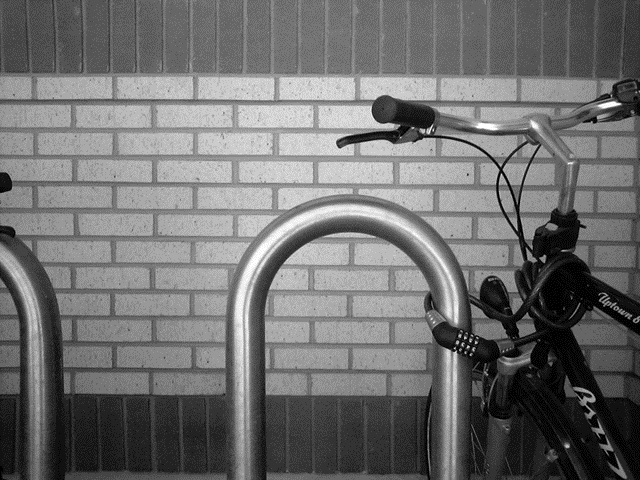
And now the output, dx on the left and dy on the right (scaled down in size so you can see them side-by-side):
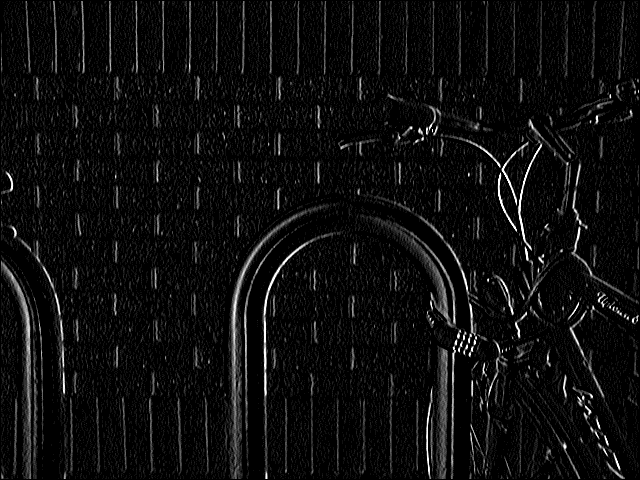
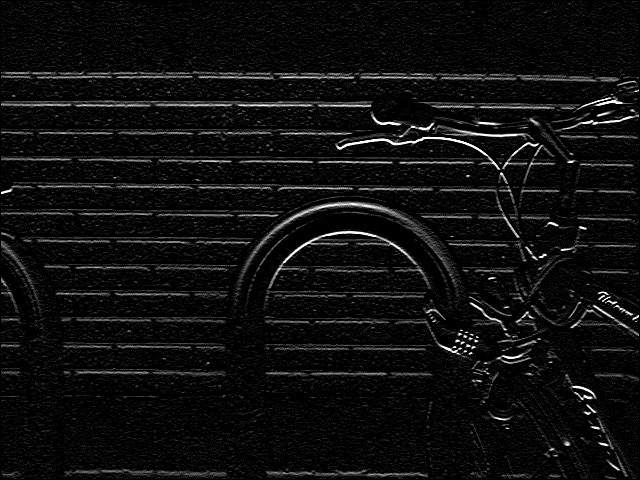
You can see that each mask favours (or detects) edges in the specific orientations we would expect, e.g. either the tops or the bottoms of the bricks, and either the top or the sides of the curved metal bike rack.